Overview
The Sabbath School Reproducer is a tool that downloads, formats, and reproduces Sabbath School lessons from historical archives for modern use. It enables users to adapt historical lessons with updated dates and formatting for current study.
Key Features
YAML-based configuration for easy customization
Automatic downloading of lesson content from GitHub
Reproduction mode for adapting historical lessons to current dates
Professionally formatted PDF generation with customizable styling
Support for custom cover designs with SVG templates
Smart file handling to avoid unnecessary re-downloads
Multi-language support with customizable translations
Double-asterisk answer formatting for proper question/answer markup
Architecture
The system consists of several components that work together:
Configuration - Loads and validates settings from a YAML file
Downloader - Fetches lesson content from the GitHub repository
Aggregator - Combines downloaded content into a single markdown file
Processor - Converts markdown to structured content data
HTML Generator - Creates HTML from structured content
PDF Generator - Converts HTML to a formatted PDF with proper pagination
Language Utils - Provides language-specific text and formatting
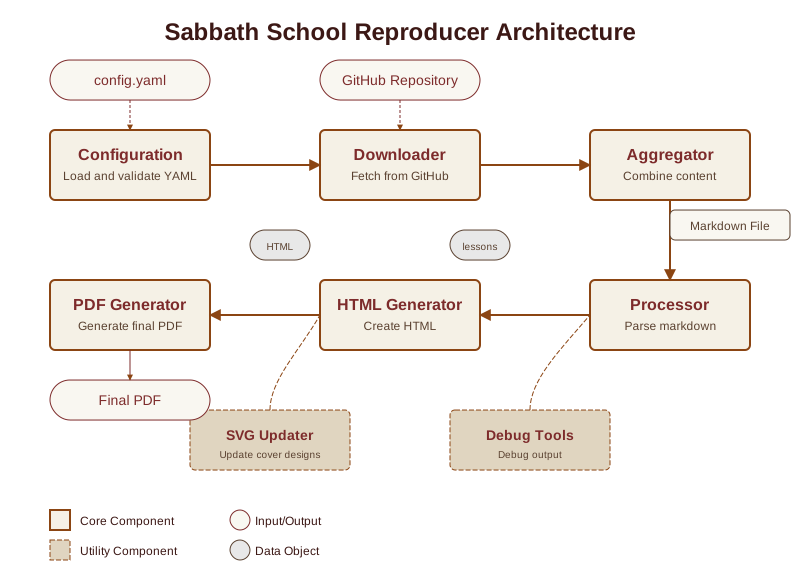
Workflow
A typical workflow involves:
Creating a configuration file with target year/quarter and source year/quarter
Running the tool to download and process the content
Reviewing the generated PDF for any adjustments needed
Distributing the final PDF for use in Sabbath School classes
Getting Started
Installation
# Clone the repository
git clone https://github.com/SabbathSchool/sabbath-school-reproducer.git
cd sabbath-school-reproducer

# Install dependencies
pip install -r requirements.txt

# Install the package for development
pip install -e .
Quick Start
The easiest way to get started is to use the initialization command:
# Initialize the environment with default settings
sabbath-school-reproducer init

# Or simply run without arguments for automatic initialization
sabbath-school-reproducer
This will create:
A default configuration file (
config.yaml)A color theme directory with a default theme
Language configuration files for all supported languages
You can then edit these files to customize your settings.
Basic Usage
# Run with a specific config file
sabbath-school-reproducer run config.yaml

# Force overwrite of existing files
sabbath-school-reproducer run config.yaml -y

# Generate only HTML for debugging
sabbath-school-reproducer run config.yaml --debug-html-only
Multi-language Support
The Sabbath School Reproducer supports multiple languages, with built-in support for:
English (en)
Swahili (sw)
Luo (luo)
Language Configuration
Each language has its own configuration file located in the languages directory. These files contain translations for all text elements that appear in the generated PDF, including:
Section headers (NOTES, QUESTIONS)
Table of contents labels
Cover page text
Quarter names and month ranges
Date formatting patterns
Customizing Translations
You can customize any translation by editing the language configuration file. For example, to modify the Swahili translations:
Open
languages/sw.yamlEdit the translations as needed
Save the file
The system will use your customized translations the next time you run the tool.
Example Language Configuration
# Language configuration for sw (Swahili)

# Basic terms
notes: 'MAELEZO'
note: 'ELEZO'
questions: 'MASWALI'
answer_prefix: 'Jibu'
lesson: 'SOMO'

# Cover page terms
sabbath_school: 'SHULE YA SABATO'
lessons: 'MASOMO'
adapted_from: 'Imetoholewa kutoka'
from_text: 'kutoka'

# Quarter names
quarter_names:
  q1: 'ROBO YA KWANZA'
  q2: 'ROBO YA PILI'
  q3: 'ROBO YA TATU'
  q4: 'ROBO YA NNE'

# Quarter month ranges
quarter_months:
  q1: 'Januari - Machi'
  q2: 'Aprili - Juni'
  q3: 'Julai - Septemba'
  q4: 'Oktoba - Desemba'

# Table of contents
table_of_contents: 'YALIYOMO'
lesson_column: 'Somo'
title_column: 'Kichwa'
date_column: 'Tarehe'
page_column: 'Ukurasa'

# Month names
month_names:
  - 'Januari'
  - 'Februari'
  - 'Machi'
  # ...other months

# Date format template
date_format_template: '{day} {month}, {year}'
Adding New Languages
To add support for a new language:
Create a new language file in the
languagesdirectory (e.g.,languages/fr.yamlfor French)Copy the structure from an existing language file
Translate all text elements
Update your configuration to use the new language:
language: fr
language_config_path: ./languages/fr.yaml
Smart File Handling
The tool now includes smart file handling to avoid unnecessary downloads:
Lesson Range in Filenames: The combined markdown filename includes the lesson range information (
combined_lessons_{year}_{quarter}_{lang}_{start_lesson}_{stop_lesson}.md)Existence Check: Before downloading, the system checks if a file matching the requested lesson range already exists
Confirmation Prompt: If a file exists, the system asks for confirmation before overwriting (unless
-yflag is used)
This approach saves bandwidth and time when running the tool multiple times with the same settings.
Answer Formatting
The processor now properly handles answers formatted with double asterisks:
1. What is the Sabbath? **A day of rest and worship.** Genesis 2:2-3.
In this format:
The question text is “What is the Sabbath?”
The answer text is “A day of rest and worship.”
The scripture reference is “Genesis 2:2-3.”
This provides a clean and consistent way to mark answers in the source markdown.
Configuration Options
Here’s a complete example configuration file with all available options:
# Sabbath School Lesson Configuration

# Year and quarter to download
year: 2025
quarter: q2
language: sw

# File paths
input_file: ./combined_lessons_2025_q2_sw_1_null.md
output_file: ./output/sabbath_school_lesson_2025_q2_sw.pdf
front_cover_svg: ./assets/front_cover.svg
back_cover_svg: ./assets/back_cover.svg
color_theme_path: ./themes/burgundy.yaml
language_config_path: ./languages/sw.yaml

# Reproduction options
reproduce:
  year: 1888
  quarter: q4
  start_lesson: 1
  stop_lesson: 13
  quarter_start_date: '2025-04-01'

# PDF metadata
title: Masomo ya Shule ya Sabato
subtitle: Robo ya 2, 2025
publisher: Gospel Sounders